

Making the Pioneer DDJ-1000 Feel Like rekordbox in Mixxx
How Danylo Cherevashko and I are building an open-source DDJ-1000 mapping for Mixxx, jog screens and all.
I play out on a Pioneer DDJ-1000 several nights a week. It's built for rekordbox, and every button, pad and screen on it assumes rekordbox is on the other end of the USB cable. I wanted to be able to play the same controller in Mixxx, the free and open-source DJ software, without relearning anything. That means the controller has to behave the way my hands expect, which is exactly how it behaves in rekordbox.
This is the story of that mapping, and of building it with Danylo Cherevashko.
What a "mapping" is
A DJ controller doesn't play music. It's a big box of knobs, faders and pads that sends MIDI messages to the software, and it lights itself up from the messages it gets back. A Mixxx mapping is the translation layer between the two: an XML file that says which message means "play deck 1", plus a JavaScript file for everything that needs logic, like jog-wheel scratching, pad modes, loop rolls or effect selection.
Mixxx already shipped mappings for a lot of Pioneer gear, but not the DDJ-1000. So we wrote one.
The goal: rekordbox, button for button
The rule for the whole project is simple: if a DJ who knows the DDJ-1000 in rekordbox picks it up in Mixxx, nothing should surprise them.
That turned out to mean hundreds of small details:
- Pad modes that match rekordbox page for page: HOT CUE, PAD FX 1 and 2, BEAT JUMP, BEAT LOOP, SAMPLER and KEY SHIFT, laid out the way rekordbox lays them out.
- Pad colours that mean the same thing. Rekordbox lights idle pads dim and pressed or active pads bright. We confirmed on the hardware that the DDJ-1000 has two forms of every colour, so the mapping uses the same numbers rekordbox sends.
- Jog wheels that feel right: scratching, pitch bend, backspin and brake, a clean stop when you let go of a flicked platter, and the jog ring blinking as a track nears its end.
- Beat FX that work like the real ones, including the small screen above the effect knobs showing the effect name, the beat value and the BPM.
Here's the cheat sheet for what the pads mean in the mapping, colour by colour:
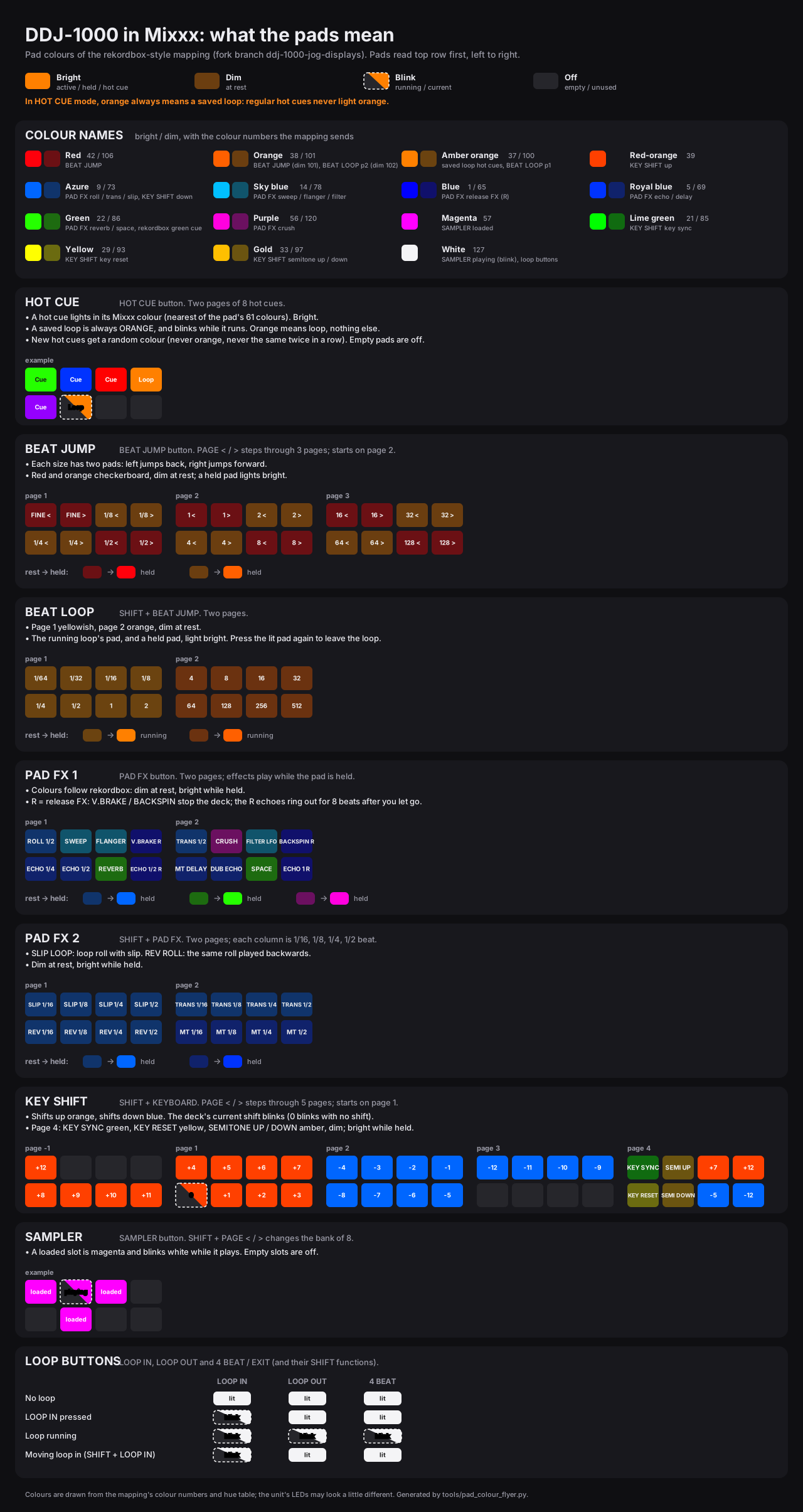
Tap the chart to open it full size.
The jog screens
The hardest part was the two screens in the middle of the jog wheels. In rekordbox they show the track's artwork, a waveform, the BPM, the key, the time remaining and the cue points. Out of the box, any other software just gets a blank screen.
Pioneer doesn't document how those screens are driven. This is where Danylo came in. He worked through the protocol message by message, testing each finding live on the controller: the playing position, the waveform and its colour scheme, the artwork, the red SLIP screen, the dimmed screen when a deck is off air, and the Beat FX display. He wrote every confirmed message up in a protocol document so that anyone can build on it.
Here's the whole protocol on one page: the three channels over the USB cable, the six steps from the Pioneer logo to a waveform, and which message draws which part of the screen.
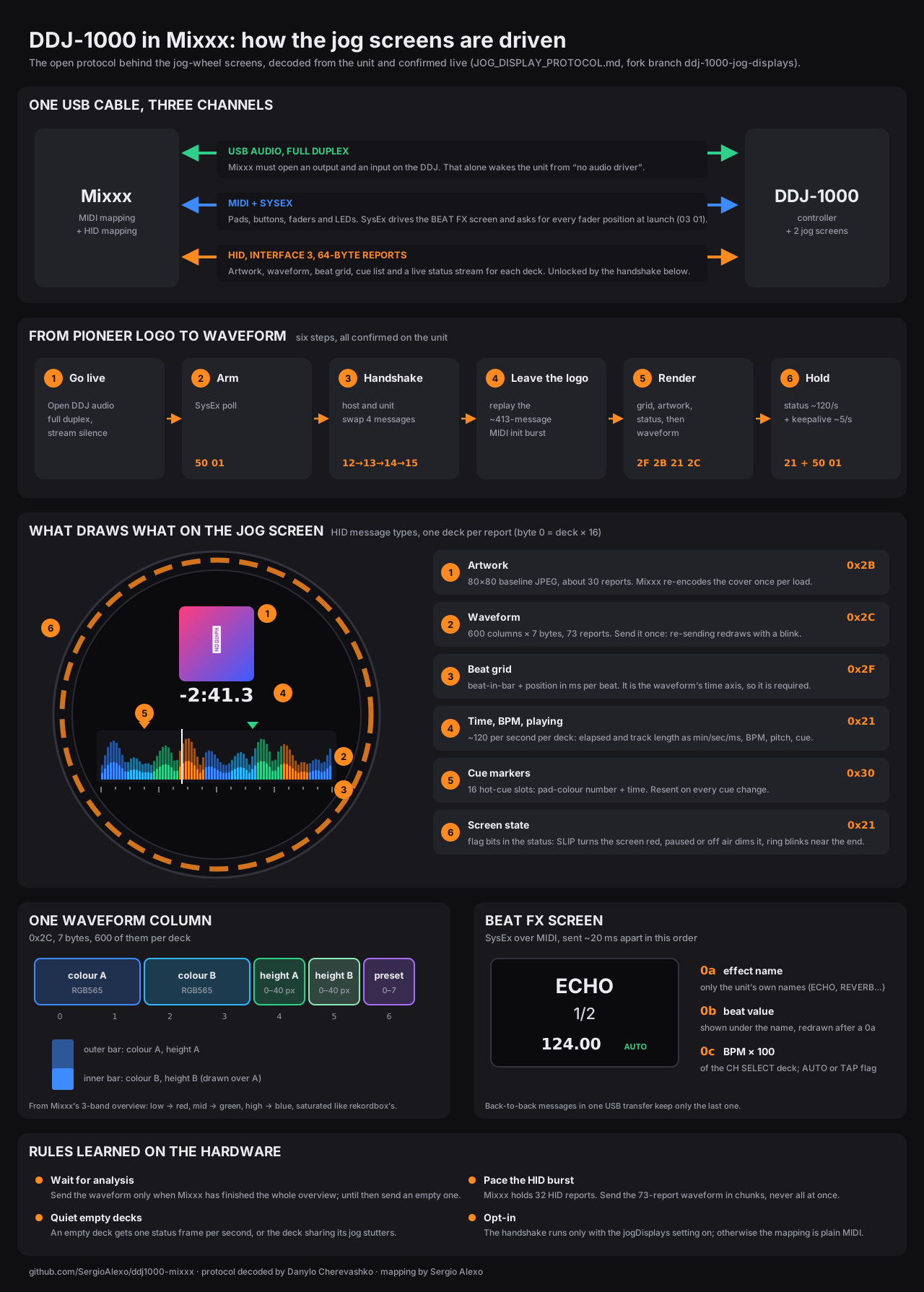
Tap the diagram to open it full size.
With that in hand, the Mixxx side can now put real information on the jog screens: the key, the tempo range, cue colours, loops, and a waveform that appears once Mixxx has finished analysing the track.
How we split the work
We work out of shared repositories on GitHub, in small commits that each do one thing:
- Danylo owns the low-level side: decoding the protocol, the jog-screen messages, the Beat FX screen and its tempo controls, and clean scratch handling.
- I own the "does it feel like rekordbox" side: pad pages and colours, hot cues, loops, the cue button, and testing everything on the controller I actually gig with.
Every change gets played on real hardware before it's called done. Some of these bugs only show up when you're mid-mix with your hands on the platters.
Giving it back
The core mapping has been submitted to the Mixxx project as a pull request (mixxxdj/mixxx#17174), with a matching page for the Mixxx manual. It went through review with the Mixxx maintainers, and we fixed what they found. The jog-screen work lives on a separate branch while it matures.
Everything is public:
- SergioAlexo/mixxx: our Mixxx fork, with the full mapping and jog-screen support on the ddj-1000-jog-displays branch.
- SergioAlexo/ddj1000-mixxx: the protocol notes, pad-colour tables and tools behind it.
Mixxx is GPL-licensed, community-built software. If you own a DDJ-1000 and have wanted a free alternative that doesn't fight the controller, this is for you, and hopefully it will soon ship in Mixxx itself.
What's next
- More hours on the hardware in real sets.
- Getting the core mapping merged upstream.
- Polishing the jog-screen support so it can follow.
If you play a DDJ-1000 and want to try it or help test it, get in touch.
Contact.
LET'S WORK
TOGETHER
Made With ❤ by Sergio Alexo